| 10/05/23 |
v2.0 |
Initial public release |
| 20/05/23 |
v2.1 |
Added instructions and improved error reporting |
| 03/06/23 |
v2.2 |
Fixed error with log location |
| 04/07/23 |
v2.3 |
Bug fixes |
| 09/10/23 |
v2.4 |
Core components updated
Bug fixes
Error handling improvements |
| 13/10/23 |
v2.5 |
Error reporting fixes |
| 21/10/23 |
v2.6 |
Save / Load Job feature added so you can save all jobs in queue to XML and quickly load them again
Core components updated
Fixed issue with Logs not being sorted correctly in Date/Time order
Exclude Files, Exclude Directories and File Filter now correctly validates entry for allowed values
Various other bug fixes |
| 25/10/23 |
v2.7 |
Core components updated
Destination path validation logic improved
Bug fixes |
| 26/10/23 |
v2.7.1 |
Fixed "Illegal characters in path" error in Destination path entry
Resolved issue where ExcludeFiles, ExcludeDirectories and FileFilter would not accept values containing spaces |
| 05/12/23 |
v2.7.2 |
Fixed "Invalid RASHCNETO string!" error when using Include / Exclude Attributes
Improved error logging |
| 27/12/23 |
v2.7.3 |
Rate and Review button added to About tab |
| 05/01/24 |
v2.7.4 |
Bug fixes |
| 15/02/24 |
v2.7.5 |
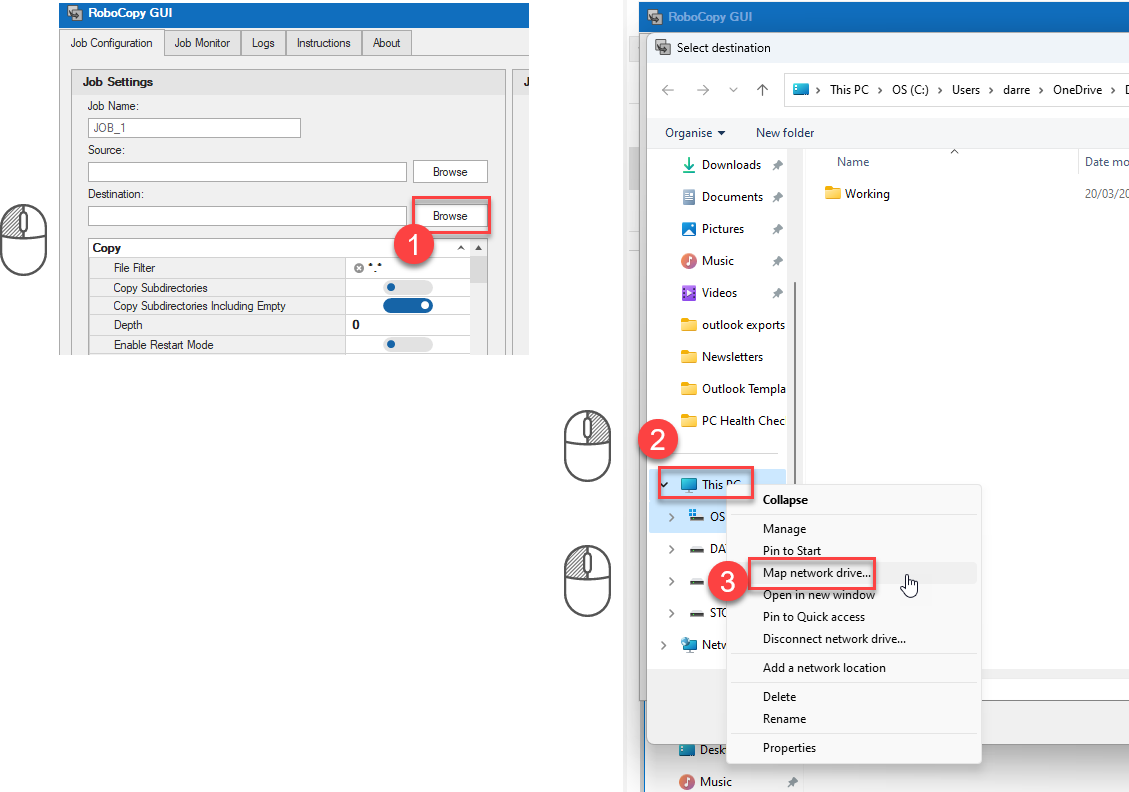
Improved folder browser dialog added for easier selection of network locations and mapping drives whilst elevated
Core components updated
Bug fixes |
| 16/02/24 |
v2.7.6 |
Fixed speed statistics shown in results and logs |
| 29/02/24 |
v2.8 |
New feature - can now parse existing RoboCopy command lines to populate your GUI settings
Now plays a sound and restores minimized window when job complete
Destination disk space issue resolved
Fixed issue with Minimum / Maximum Last Access Date switches not working correctly
Core components updated
Various miscellaneous bug fixes and code improvements |
| 05/03/24 |
v2.8.1 |
Improvements made to error reporting and handling
Multiple jobs in queue can now be run concurrently if required |
| 13/03/24 |
v2.8.2 |
Fixed multiple job checkbox not enabling when loading saved jobs from file
Added Include Modified (/IM) switch
Core components updated |
| 14/03/24 |
v2.8.3 |
Bug fix |
| 20/03/24 |
v2.9 |
Major improvements to memory usage to resolve 'System.OutOfMemoryException' errors on large jobs
Core components updated |
| 19/04/24 |
v3.0 |
Core components updated
New feature - Ability to schedule jobs to run at specific times/days (Portable Business version only)
Email notifications (Portable Business version only) |
| 26/05/24 |
v3.1 |
Core components updated
Parsing of UNC paths fixed
Multiple fixes and improvements made to job scheduler |
| 26/07/24 |
v3.1.1 |
Core components updated
Fixed issue where : not an allowed character for file / folder exclusions |
| 23/08/24 |
v3.2 |
Core components updated
Various improvements and fixes relating to email notifications
N.B. This release applies to Portable Business version only |
| 09/11/24 |
v3.2.1 |
Core components updated
More error information added for issues when using Load Jobs - including new Common Errors section below |
| 15/11/24 |
v3.2.2 |
Core components updated
Fixed issue with email notifications and log attachment
N.B. This release applies to Portable Business version only |
| 02/12/24 |
v3.3 |
Added ability to edit existing scheduled tasks allowing you to change command line and email address
N.B. This release applies to Portable Business version only |
| 26/12/24 |
v3.3.1 |
Core components updated
Log file attachment size check added to email alerts
Resolved FileFilter issue where it was changing filter in existing jobs when adding new job to queue |
| 29/01/25 |
v3.3.2 |
Fix MSIX elevation capability failures on Windows 11 24H2 and later |
| 01/04/25 |
v3.3.3 |
Selected job in queue now populates property grid
Various bug fixes |
| 01/06/25 |
v3.4 |
New improved log viewer with highlighting and filtering
Bug fixes
Core component updates |
| 19/08/25 |
v3.5 |
Internal code optimizations and fixes
Core component updates |
| 25/09/25 |
v3.6 |
Fix for Google Drive destinations |
| 03/12/25 |
v3.7 |
Core component updates
Code optimizations |
| 05/01/26 |
v3.8 |
Core component updates
Writable CD and DVD media now supported as destinations |
| 13/01/26 |
v3.9 |
Added ability to copy selected Job in Queue settings to Scheduler (Portable Business version only)
Code optimization
UI tweaks
Command line parsing bug fixes |
| 29/01/26 |
v3.9.1 |
DPI support enabled for high resolution displays
Log file now zipped before sending via email to allow larger log files (Portable Business version only) |
| 02/02/26 |
v3.9.2 |
Various tweaks and fixes related to display scaling / DPI support |
| 16/02/26 |
v3.9.3 |
Added missing flags to COPY and DCOPY |
| 20/05/26 |
v3.9.4 |
Fixed issue with DPI support
Zipped log file attached for email alerts now optional (Portable Business version only)
Job name added to email alert subject and log file name for scheduled jobs (Portable Business version only)
Various tweaks and bug fixes |
| 04/07/26 |
v3.9.5 |
Miscellaneous bug fixes and tweaks
N.B. This release applies to Portable Business version only |